Dear Ventura Park Families,
As the religious holidays approach we would like to remind all parents to please enter your children’s religious holiday absences on Edsby.
Thank you for your cooperation,
VPPS Team
Dear Ventura Park Families,
As the religious holidays approach we would like to remind all parents to please enter your children’s religious holiday absences on Edsby.
Thank you for your cooperation,
VPPS Team
You will be getting an email from YRDSB this week with a link to read the Guide to the School Year as well as a link to complete the School Start Up forms. It is very important that you fill out the forms.
In order to fill out the forms, you must log in to your child(den)s google account – and if you have more than one child, log in to each child’s in turn. This is the same login that would have been used for all google class work and for retrieving report cards. While we know this is not an easy process for many families- the forms are VERY important and required for your child to be able to use school technology, go on field trips etc.
If you need help logging in to your child’s account, or if you are new to YRDSB, please contact the teacher or the office.
Your child will also bring a Guide to the School Year booklet, please review this information together.
Thank you in advance for completing the forms. Below is a copy of the email you will be receiving.
YRDSB email: School Start-Up Forms
Dear parents/guardians,
At the start of each school year, schools share with families a package of information about the school. Families will also receive a copy of the Guide to the School Year booklet in the coming weeks. We also ask families to complete some important forms. These forms are now available online.
Please complete and submit these online School Start-Up Forms through your child’s YRDSB Google account.
· You can access your child’s YRDSB Google account via a web browser. For best results, use a computer rather than a mobile phone.
· The username is your child’s YRDSB Student Number. Your child will receive their login information from the school at the start of the year. If you or your child do not know the password to log in to their Google account, please contact your child’s teacher or the school office.
· Frequently asked questions and additional information on how to complete the forms are available on the Board website under Family Resources (click on the “Need Help” link for Family Start-Up Forms.
It is important that these forms are completed as soon as possible at the start of the school year. There are both mandatory and optional forms. The forms are to be completed for all students, whether they are attending school in person or participating in remote, online learning. Your child’s school will access the information.
Please complete a separate form for each child attending our schools. Secondary school students will also be asked to review important school and Board policies and to indicate that they have reviewed this information on forms sent to their student GAPPS account.
If you prefer to complete the forms on paper or have questions about the information in the forms, please contact your school office. Thank you
You will be getting an email from YRDSB this week with a link to read the Guide to the School Year as well as a link to complete the School Start Up forms. It is very important that you fill out the forms.
In order to fill out the forms, you must log in to your child(den)s google account – and if you have more than one child, log in to each child’s in turn. This is the same login that would have been used for all google class work and for retrieving report cards. While we know this is not an easy process for many families- the forms are VERY important and required for your child to be able to use school technology, go on field trips etc.
If you need help logging in to your child’s account, or if you are new to YRDSB, please contact the teacher or the office.
Your child will also bring a Guide to the School Year booklet, please review this information together.
Thank you in advance for completing the forms. Below is a copy of the email you will be receiving.
YRDSB email: School Start-Up Forms
Dear parents/guardians,
At the start of each school year, schools share with families a package of information about the school. Families will also receive a copy of the Guide to the School Year booklet in the coming weeks. We also ask families to complete some important forms. These forms are now available online.
Please complete and submit these online School Start-Up Forms through your child’s YRDSB Google account.
· You can access your child’s YRDSB Google account via a web browser. For best results, use a computer rather than a mobile phone.
· The username is your child’s YRDSB Student Number. Your child will receive their login information from the school at the start of the year. If you or your child do not know the password to log in to their Google account, please contact your child’s teacher or the school office.
· Frequently asked questions and additional information on how to complete the forms are available on the Board website under Family Resources (click on the “Need Help” link for Family Start-Up Forms.
It is important that these forms are completed as soon as possible at the start of the school year. There are both mandatory and optional forms. The forms are to be completed for all students, whether they are attending school in person or participating in remote, online learning. Your child’s school will access the information.
Please complete a separate form for each child attending our schools. Secondary school students will also be asked to review important school and Board policies and to indicate that they have reviewed this information on forms sent to their student GAPPS account.
If you prefer to complete the forms on paper or have questions about the information in the forms, please contact your school office. Thank you
Dear Ventura Park Families,
As the religious holidays approach we would like to remind all parents to please enter your children’s religious holiday absences on Edsby.Thank you for your cooperation,
VPPS Team
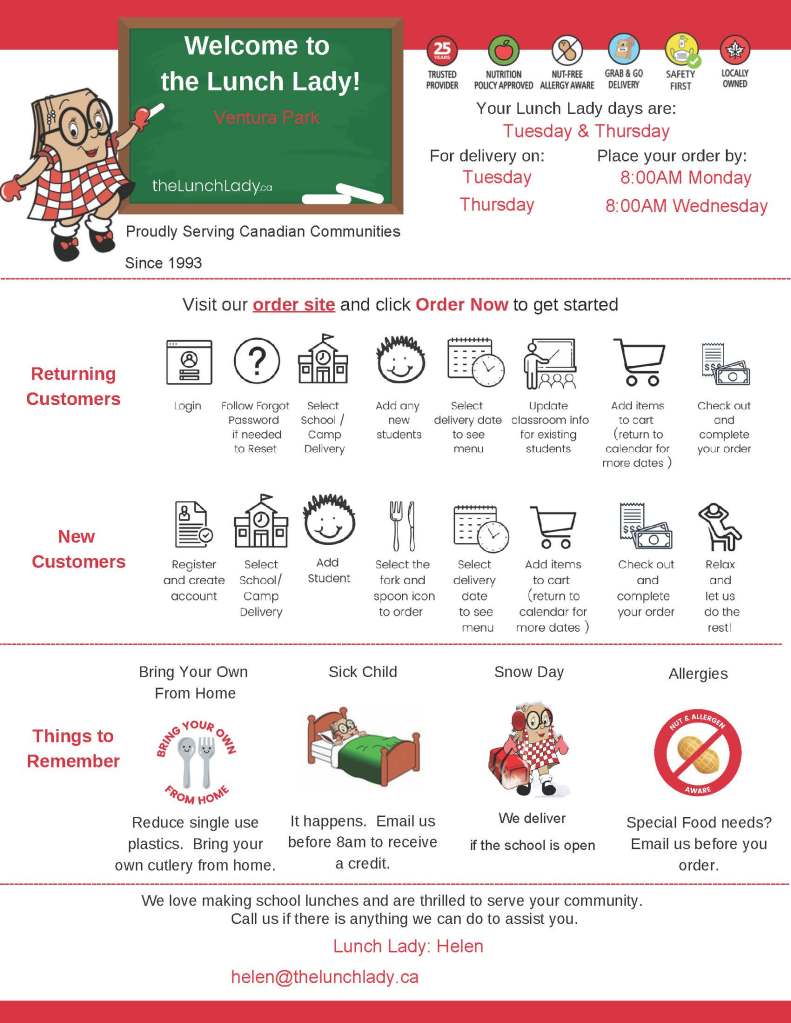
Please click here to go to the order site: https://order.lunchlady.ca/
Dear parents/guardians,
Please see below our school organization for the 2022-2023 school year. We are really excited about this upcoming school year!
It is essential that you go to www.schoolbuscity.com to confirm drop off and pick up times, locations and bus numbers. Bus numbers in the morning may differ from bus numbers in the afternoon. Please communicate this information to your child, and remind them often, as they get comfortable with the new routine.
For those of who are doing drop-off and pick-up at school, please be aware that safety comes first when dropping off your children. We discourage entry into our school parking lot during 8:45-9:05 for morning entry, and 3:10-3:40 for dismissal, due to safety reasons.
For all our new families, the Ventura Park Blog is our primary source of communication. Please check the blog often and sign up for notifications when updates are made. It is a good idea for all family members to be connected to our blog.
We have received a number of phone calls about Edsby not working. We are aware of the situation and appreciate your patience as we navigate next steps.
Thank you,
Greg and Laura
STAFF 2022-2023
Bove-Morgani    1A
Minchopoulos    1B
Ghitulescu  1C
Andre   2A
Kasmani 2B
Moccia  2C
Adibi   2D
Papadakis   3A
Bellman 3B
Tyrrell 3C
Lyon    3D

Avagyan 4A
Arro    4B
Liu 4/5A
Palfi   4/5B
Dakran  5A
Patrick 5/6A
Babin   6A
Karamy  6B

Opatowski   7A
Gallichio   7B
Botelho 7/8A
Shifman 8A
Bracken 8B
Maisel  8C
Thank you to our students, families and all of the amazing VPPS Team for a phenomenal school year.
We are so grateful for all of your support and your contributions.
Continue to be extraordinary!
Have a safe and happy holiday.
The VPPS Team

 Ventura Park PS BLOG
You must be logged in to post a comment.